
Rotorflight - Tuning I-Term Relax
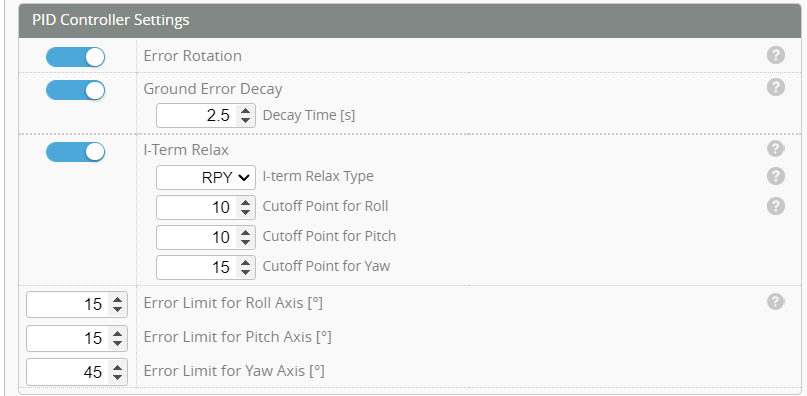
Lower values suppress bounce‑back after movements, high values increase high‑rate turn precision. Set to 15–30 for small helis, 10–15 for mid‑size, and less than 10 for large.
Understanding I‑Term Relax
The I‑Term Relax parameter controls how aggressively the integral term (I‑term) in the PID loop accumulates during rapid angular changes. In rotorcraft flight control, the I‑term corrects steady‑state error — but during fast maneuvers (like rolls or flips), excessive accumulation can cause overshoot or bounceback when the movement stops.
I-Term relax is measured in cycles per second (Hz) and so raising the value means you are moving the cut-off to a higher frequency and is supposedly less relaxing but is used to "tighten" up a manuever. If you are having harder bounce-backs you would actually drop the I-Term relax value. The bounce-back that this parameter will affect is the one that occurs after a series of maneuvers, consecutively and then the inputs stop.
Tuning Procedure
| Step | Action | Observation | Adjustment |
|---|---|---|---|
| 1. Start with recommended range | Use 15–30 for small helis, 10–15 for mid‑size, <10 for large. | Begin with mid‑range value for your size. | Adjust based on bounceback or precision needs. |
| 2. Observe fast rolls or flips | Perform quick rolls or flips at moderate speed. | If the heli bounces back or overshoots when stopping, the I‑term is too active. | Lower I‑Term Relax value. |
| 3. Check precision at high rates | Perform sustained high‑rate turns or fast cyclic inputs. | If the heli feels loose or imprecise, the I‑term is too relaxed. | If the heli feels loose or imprecise, the I‑term is too relaxed. |
| 4. Fine‑tune for balance | Alternate between fast rolls and sustained turns. | Seek smooth stops with crisp control. | Adjust until bounceback disappears but precision remains. |
Behavioral Summary:
| Value Range | Effect |
|---|---|
| Low (5–10) | Suppresses bounceback; smoother stops; slightly softer feel. |
| Medium (10–20) | Balanced response; good for general aerobatics. |
| High (20–30) | Sharper precision at high rates; may cause bounceback if too high. |
Goal:
Achieve clean stops after fast maneuvers without losing high‑rate precision.
Think of it as a damping control for the integral term — too little damping causes rebound, too much makes the heli sluggish.
⚙️ Comparison: I‑Term Relax vs HSI Offset Gain
| Parameter | Primary Function | When It’s Active | Key Symptoms if Mis‑tuned | Typical Adjustment Range |
|---|---|---|---|---|
| HSI Offset Gain | Stabilizes attitude and control at high speed and large collective angles. | Engages during high‑speed flight and large pitch changes. | Too low → diving or sluggish response; too high → oscillation or restlessness. | Small heli: 20–40 Mid‑size: 10–20 Large: <10 |
| I‑Term Relax | Limits integral accumulation during fast angular motion to prevent bounceback. | Active during rapid rolls, flips, or cyclic transitions. | Too low → sluggish stops; too high → bounceback or overshoot. | Small heli: 15–30 Mid‑size: 10–15 Large: <10 |
🧠 How They Work Together
- HSI Offset Gain governs macro‑level stability — how the heli behaves at high speed and large collective pitch angles.
- I‑Term Relax governs micro‑level precision — how the heli behaves during rapid attitude changes and stops.
Think of HSI Offset Gain as the “high‑speed stabilizer”, and I‑Term Relax as the “motion dampener.” Together, they balance stability and responsiveness across the flight envelope.
🧭 Tuning Strategy
- Start with HSI Offset Gain
- Tune for stability at high speed and large collective pitch.
- Ensure no diving or oscillation during fast forward flight.
- Then fine‑tune I‑Term Relax
- Perform fast rolls or flips.
- Adjust to remove bounceback while keeping crisp stops.
- Iterate between both
- Small changes in one can affect the other.
- Example: Increasing HSI Offset Gain may require slightly lowering I‑Term Relax to prevent rebound at high speed.
🎯 Goal
Achieve a heli that:
- Tracks straight and stable at high speed (HSI tuned),
- Stops cleanly after fast maneuvers without rebound (I‑Term Relax tuned),
- Feels precise yet smooth across all flight regimes.
A video tuning example
In this video, Ben Britton notices a deficiency in a flight characteristic of his model that he uses the I-Term relax to adjust. The video has been time indexed to the correct time when Ben discusses I-Term relax - Just press "Play".
Note: You may later decide to "rewind" the video before our start point in order to see the maneuvers he uses to discover the deficiency.