Rotorflight 4.7 Early Look: The Game-Changing Setup Wizard & Tune Advisor
An in-depth preview of the upcoming Rotorflight 4.7 release, detailing the new step-by-step Setup Wizard, UI refactoring, web-based configurator workflows, and in-flight Tune Advisor telemetry integration.
Paradigm Shift
Rotorflight has historically offered powerful open-source flight control performance for RC helicopters, but setting up a fresh machine previously required jumping back and forth across multiple tabs, executing manual CLI commands, and hunting through parameter lists. The early preview of Rotorflight 4.7 introduces a structural redesign aimed at eliminating technical friction.
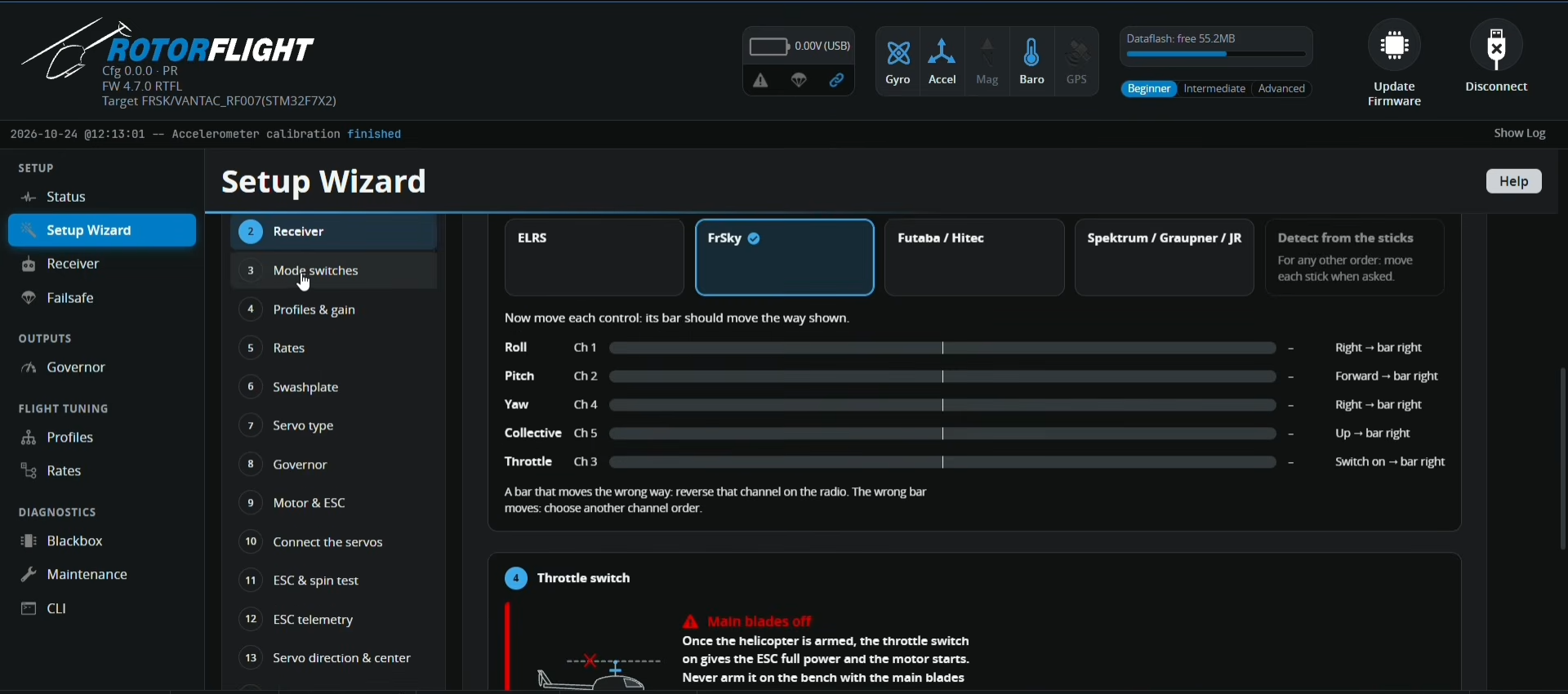
By introducing a guided 19-step Setup Wizard alongside tiered experience profiles, Rotorflight 4.7 lowers the entry barrier for beginners while streamlining bench maintenance for seasoned pilots. Furthermore, development progress on features like Tune Advisor brings automated closed-loop flight analysis directly to transmitter screens and configurator interfaces.
Beginner, Intermediate, and Advanced
A major user-interface addition in Rotorflight 4.7 is the top-level experience mode selector. Located on the top navigation bar, pilots can toggle between three tailored configuration profiles:
- Beginner Mode: Simplifies the sidebar menu by suppressing complex parameter lists. Non-essential tabs are hidden, funneling all initial configuration steps directly into the structured Setup Wizard.
- Intermediate Mode: Unlocks essential tuning and output tabs for pilots who need targeted manual adjustments while maintaining a clean, clutter-free workspace.
- Advanced Mode: Restores full access to all traditional Rotorflight menus, raw CLI tools, detailed mixer adjustments, custom servo programming, and low-level PID configurations.
Wizard Breakdown
The Setup Wizard replaces unstructured tab-hopping with a linear, 19-step interactive roadmap. Key workflow highlights include:
-
Steps 1-2: Board Orientation & Automated Accelerometer Calibration
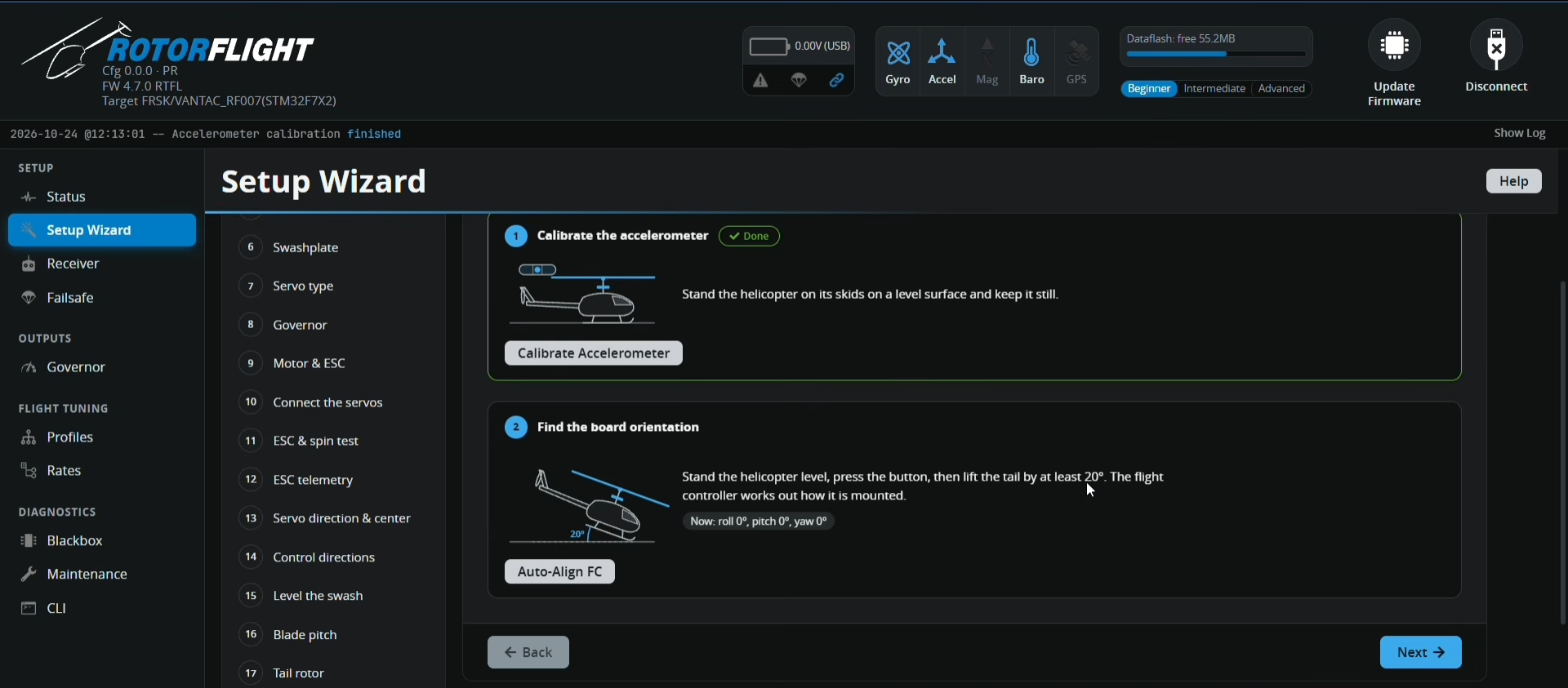
Calibrating accelerometer Walks the pilot through mounting checks. The accelerometer calibration is completed with a single click while the heli sits level, followed by an interactive orientation detection check where tilting the airframe by 20° lets the flight controller determine its mounting orientation automatically.
-
Steps 3-4: Smart Receiver Detection & Channel Mapping
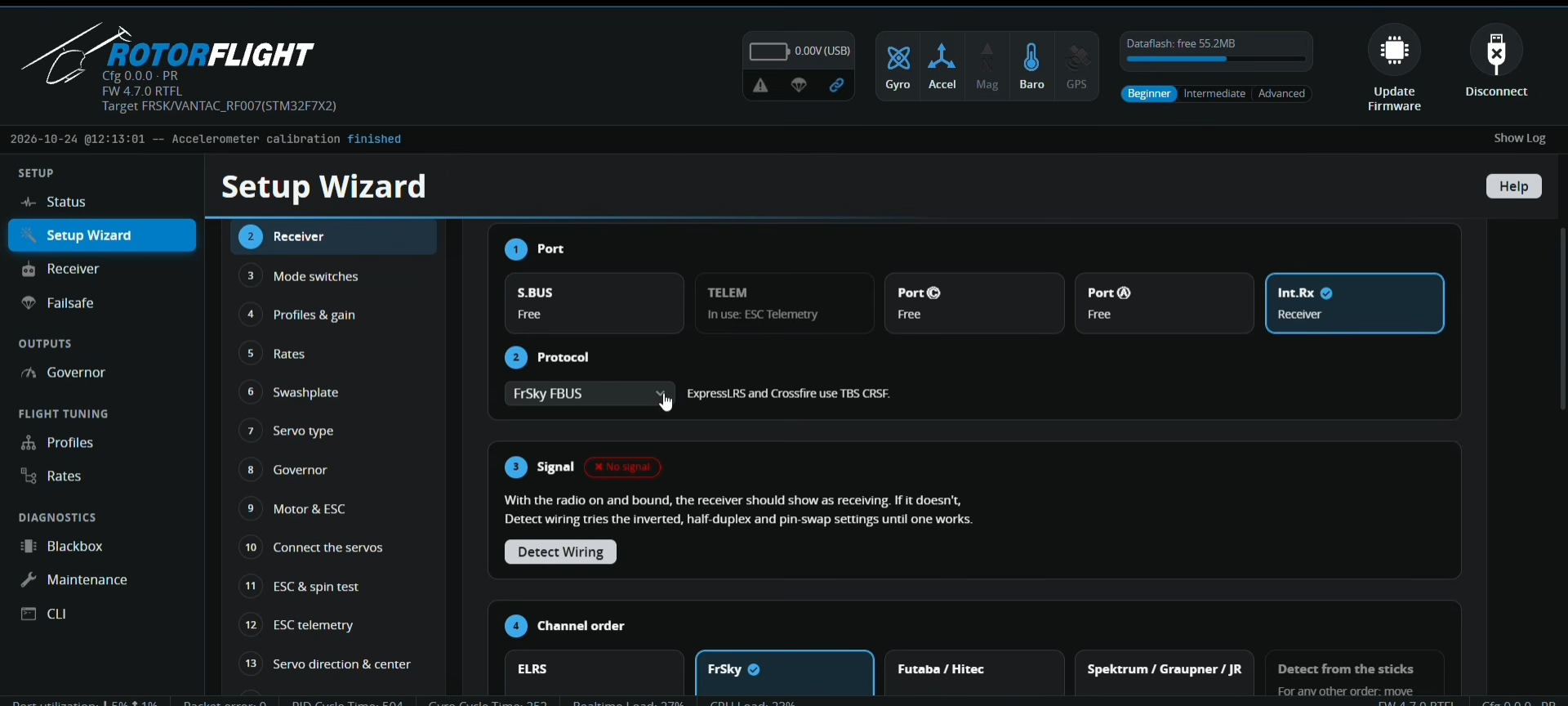
Reciever Configuration - 1 Eliminates serial port confusion. A built-in Detect Wiring scanner tests inverted protocols, half-duplex modes, and pin-swaps automatically until a valid link is found. Channel order presets for ELRS, FrSky, Futaba, and Spektrum map control axes instantly.
-
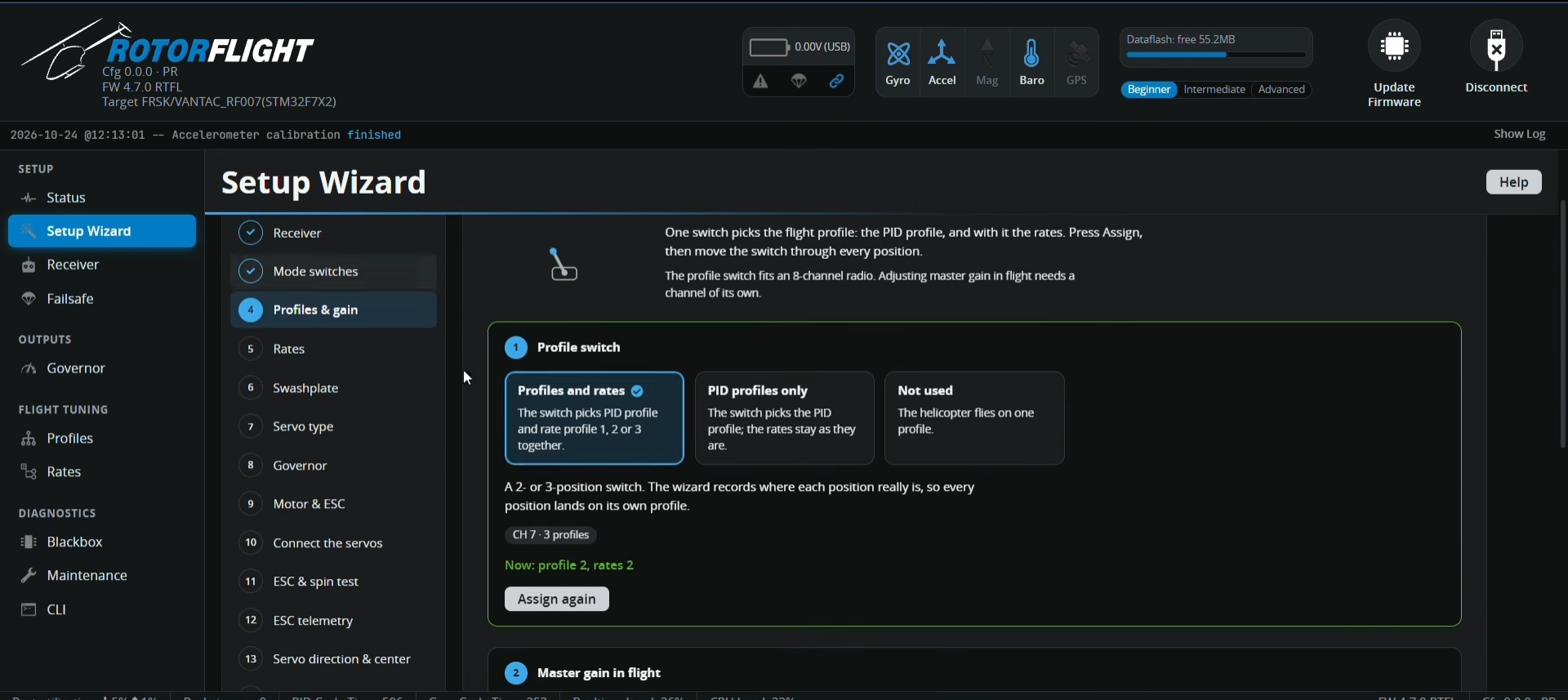
Profile Management Steps 5-6: Switches, Profiles, and Flying Style Presets
Guides the user through assigning arming, mode, and profile switches. Flying style presets (Trainer, Sport, and 3D) apply tuned base rates to match the pilot's experience level without manual rate table entry.
-
Steps 7-9: Swashplate, Servo Type, and Powertrain Setup
Offers clear graphical swashplate representations. Servo pulse settings (1520µs 50Hz, 1520µs 333Hz, or 760µs 560Hz narrow-band) are selected via visual cards. Motor pole counts, gear ratios, and DShot ESC protocols are verified step-by-step to ensure governor functionality.
-
Steps 10-12: Safe Hardware Connection & Momentary ESC Spin Test
The wizard explicitly instructs the pilot to keep servos and motor leads unplugged during initial software setup. For motor testing, traditional risky sliders are replaced with a safety-interlocked Hold to Spin momentary button that instantly cuts throttle the moment it is released.
-
Steps 13-19: Servo Centering, Swash Leveling, Pitch Trims, and Gyro Verification
Provides interactive 20° servo bump checks to verify directional movement. Visual swash leveling routines, pitch trim controls, tail rotor calibration, and interactive gyro-correction directional checks complete the pre-flight routine.
Matrix & Workflow Enhancements
| Feature Domain | Rotorflight 4.6 (Current) | Rotorflight 4.7 (Wizard Preview) |
|---|---|---|
| Firmware Flashing & Backups | Requires manual CLI diff default exports prior to flashing new targets. |
Automated during flash workflow. Offers single-click memory differential backups and automatic post-flash restoration. |
| Receiver Protocol Setup | Manual UART mapping, inversion toggling, and half-duplex CLI configuration. | Interactive Detect Wiring tool auto-scans inverted signals, pin-swaps, and protocol settings. |
| Servo Pulse Frequency | Manual numeric entry for center pulse (µs) and frame rate (Hz). | Graphical preset cards for Analog (1520/50), Digital (1520/333), and Narrow Band (760/560). |
| ESC Motor Spin Testing | Standard toggle box and slider. | Safety-interlocked Hold to Spin momentary control. Motor stops immediately upon releasing the button. |
| Cross-Platform Access | Standalone desktop application installers. | Full WebUSB web-app implementation running straight from compatible web browsers and mobile devices. |
Closed-Loop In-Flight Telemetry Analysis
Beyond the Setup Wizard, Rotorflight 4.7 introduces Tune Advisor, an intelligent background tracking feature. While flying in rate mode, the flight controller continuously monitors stick inputs against airframe angular velocity responses (comparing pilot request versus actual fulfillment).
- Data Logging: Measures rate responses (requiring short stick inputs between 40-200 deg/s) and bounce-back behavior during clean stick releases.
- Telemetry Transmission: Automatically syncs telemetry logs to transmitter Lua suites (Ethos/EdgeTX) upon disarming.
- Actionable Recommendations: Evaluates tracking lag or overshoot and generates explicit tuning suggestions (e.g., "Roll response is 20% behind stick input; increase P-gain from 85 to 100").
& Overall Assessment
Rotorflight 4.7 marks a significant maturation point for open-source RC helicopter flight control. By combining WebUSB browser compatibility, automated backup retention, guided setup interlocks, and automated in-flight tuning diagnostics, Rotorflight effectively eliminates the steep setup curve that previously intimidated newcomers.
Because the underlying flight controller architecture remains fully backward-compatible with 4.6 setups, pilots can look forward to a seamless upgrade path when the official 4.7 firmware and configurator packages are publicly released.